Usage
This document highlights the available actions of the Identity Experience Framework page such as login, registration, forgot password, profile page, etc. You can utilize all of the available actions and customize the user interface as per your needs. Follow the customization document for more details.
Available Actions
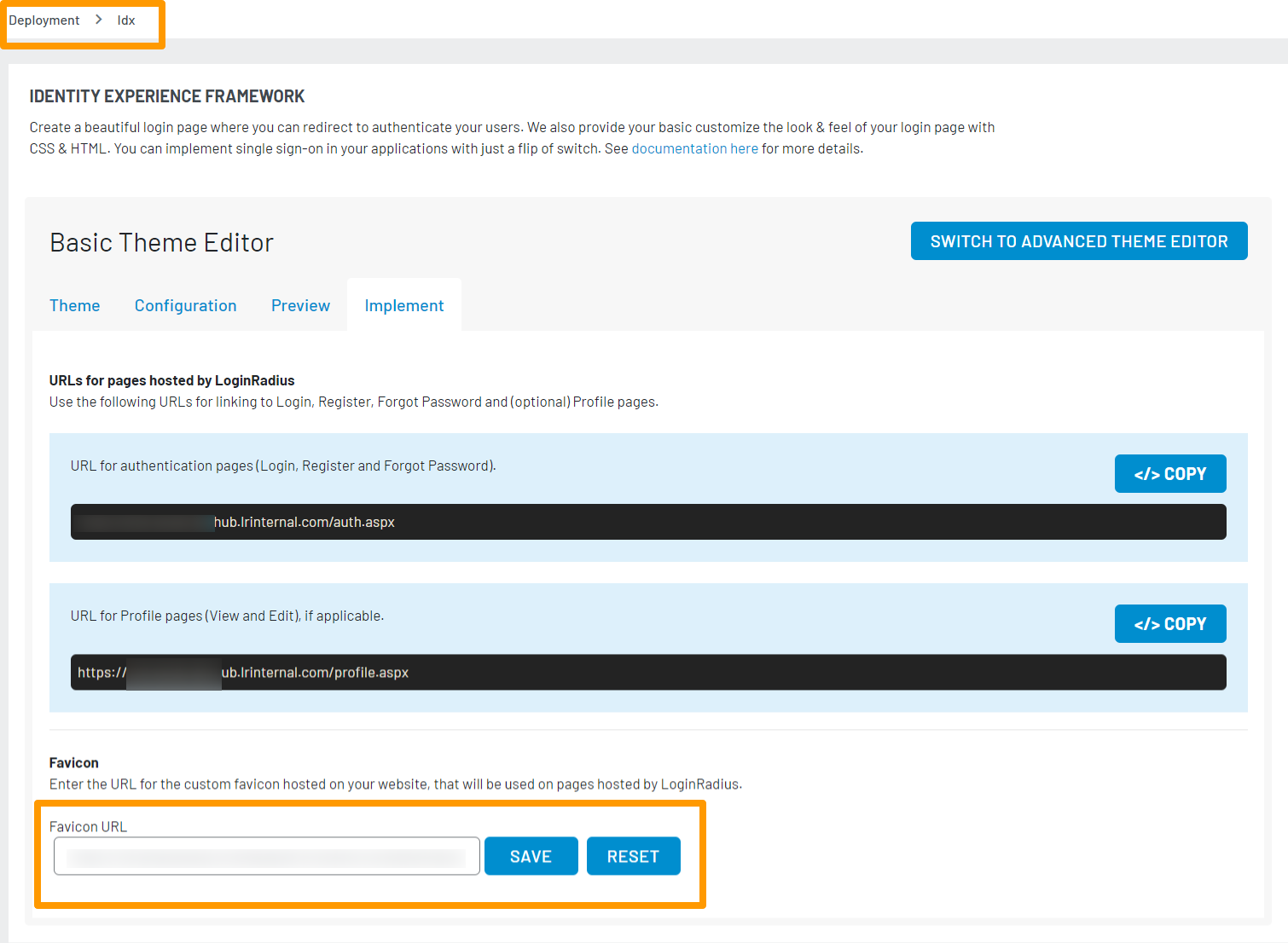
You can get the URLs of all the available actions listed below from Admin Console under Deployment > Identity Experience Framework, select Implement tab from the Theme Editor as shown in the below screen:

Below is a list of the available actions with the LoginRadius Identity Experience Framework Page:
1. Login
To display the Login interface, direct your customers to this URL:
https://<LoginRadius site name>.hub.loginradius.com/auth.aspx?action=login&return_url=<Return URL>
2. Registration
To display the Registration interface, direct your customers to this URL:
https://<LoginRadius site name>.hub.loginradius.com/auth.aspx?action=register&return_url=<Return URL>
3. Forgot Password
To display the Forgot Password interface, direct your customers to this URL:
https://<LoginRadius site name>.hub.loginradius.com/auth.aspx?action=forgotpassword&return_url=<Return URL>
4. Profile Page
To display the User Profile interface, direct your customers to this URL:
https://<LoginRadius site name>.hub.loginradius.com/profile.aspx
5. Logout
To display the Logout interface, direct your customers to this URL:
https://<LoginRadius site name>hub.loginradius.com/auth.aspx?action=logout&return_url=<Return URL>
Note: Replace
<LoginRadius site name>with Your LoginRadius Site Name which you can find with these instructions and the<Return URL>with the locations you would like to direct customers after successfully completing the action.
Favicon
You can upload your custom favicon on your website, Add/Reset the Favicon URL in the Favicon URL field as shown below in the screen:
Token Handling
LoginRadius’ default script sends an Access-Token in the query string as a token parameter the return_url that you specified in the action URL. This can be used to retrieve profile data and handle additional user functionality.
Following are the examples utilizing multiple languages and their SDKs to identify this token and retrieve user data.
<?php
include "config.php";
$actual_link = "http://" . $_SERVER[HTTP_HOST] . $_SERVER[REQUEST_URI];
$actual_link = preg_replace('/\?.*/', '', $actual_link);
if (isset($_REQUEST['token']) && !empty($_REQUEST['token'])) {
use \LoginRadiusSDK\CustomerRegistration\Authentication\AuthenticationAPI;
$authenticationAPI = new AuthenticationAPI();

$result = $authenticationAPI->getProfileByAccessToken($_REQUEST['token'],null);

echo '<pre>';
    var_dump($result);
    echo '</pre>';
    }

view:

    <!DOCTYPE html>
    <html>
    <body>
        <div>
            <a href="https://<LoginRadius Site Name>.hub.loginradius.com/auth.aspx?action=login&return_url=<Your Website Domain>.index.php">Login</a>
        </div>
    </body>
    </html>
Controller :

using System.Web.Mvc;
using LoginRadiusSDK.V2.Api;
using LoginRadiusSDK.V2.Models;

namespace Sample.Controllers
{
    public class HomeController : Controller
    {
        public ActionResult Index()
        {
            return View();
        }


        public JsonResult Login(string token)
        {

            string fields = null; //Optional

            var apiResponse = new AuthenticationApi().GetProfileByAccessToken(token, fields);

            if (apiResponse.RestException == null)
            {
                return Json(apiResponse.Response, JsonRequestBehavior.AllowGet);
            }
            else
            {
                return Json(apiResponse.RestException, JsonRequestBehavior.AllowGet);
            }
        }
    }
}


View :

@{
    Layout = null;
}
<!DOCTYPE html>
<html>
<body>
    <div>
        <a href="https://<LoginRadius Site Name>.hub.loginradius.com/auth.aspx?action=login&return_url=<Your Website Domain>/home/login">Login</a>
    </div>
</body>
</html>
router.get('/login/tonkenhandling', function (req, res) {

    var fields = null; //Optional

    lrv2.authenticationApi.getProfileByAccessToken(req.query.token, fields).then((response) => {
       console.log(response);
    }).catch((error) => {
       console.log(error);
    });
});


view:

<!DOCTYPE html>
<html>
 <head>
   <title>Node JS</title>
 </head>
 <body>
   <h1>Node JS SDK</h1>
   <a href="https://internal-narendra.hub.loginradius.com/auth.aspx?action=login&return_url=http://localhost:3000/login/tonkenhandling">Login</a><p>To get the profile....</p>
 </body>
</html>
#Your API Credentials
API_SECRET = "your-secret-key"
API_KEY = "your-api-key"

#Essential package for LoginRadius to communicate
from LoginRadius import LoginRadius as LR

LR.API_KEY = "<API-KEY>"
LR.API_SECRET = "<API-SECRET>"


#LR.LIBRARY ='urllib2'
login = LR()
#We need a request
import cgi
#Get the 'token' from the POST request
arguments = cgi.FieldStorage()
token = arguments.getvalue('token')
profile = login.authentication.get_profile_by_access_token(token, fields)

Print (profile)


view:

print "Content-Type: text/html;charset=utf-8\r\n\r\n"
print '<html>'
print '<head>'
print '<title>LoginRadius - Example</title>'
print '</head>'
print '<body>'

   <h1>Python SDK</h1>
   <a href="https://internal-ankit.hub.loginradius.com/auth.aspx?action=login&return_url=http://localhost/python-demo/backend.py">Login</a><p>To get the profile....</p>
print '</body>'
print '</html>'
LoginRadiusSDK.Initialize init = new LoginRadiusSDK.Initialize();
init.setApiKey("<your-loginradius-api-key>");
init.setApiSecret("<your-loginradius-api-secret>");
 String token = request.getParameter("token");
 LoginRadiusClient client = new LoginRadiusClient();
 client.setToken(token);
 Gson gson = new Gson();

 if (token != null) {
  session.setAttribute("lrtoken", token);

  AuthenticationApi authenticationApi = new AuthenticationApi();
  authenticationApi.getProfileByAccessToken(token, fields ,  new AsyncHandler<Identity> (){

  @Override
   public void onFailure(ErrorResponse errorResponse) {
    out.println(e.getErrorResponse().getDescription());
   }
   @Override
   public void onSuccess(Identity response) {
    out.println(gson.toJson(userProfile));
   }
  });
 }

 View :
 <!DOCTYPE html>
 <html>
 <body>
     <div>
         <a href="https://<LoginRadius Site Name>.hub.loginradius.com/auth.aspx?action=login&return_url=<Your Website Domain>/home/login">Login</a>
     </div>
 </body>
 </html>
iframe Flows
The iframe implementation is an extension of the LoginRadius Identity Experience Framework page, this allows you to display the Identity Experience Framework page directly on your website in an iframe. The Identity Experience Framework will emit any events (success and error) directly to the callback handlers on the parent window. Please see our iframe Implementation Demo documentation for details.