Overview
This document covers the Custom Identity Provider introduction and the protocols that LoginRadius Identity Platform supports for identity authentication and authorization with the custom identity provider.
Custom Identity Providers Introduction
LoginRadius allows configuring a third-party identity provider for the identity authentication and authorization process, where LoginRadius acts as a service provider.
Custom Identity Provider implementation is necessary if you need to use an external database to authenticate your application users instead of the application’s database on your LoginRadius Server. It allows you to easily integrate your user base with LoginRadius and works the same way as Facebook/Twitter SSO.
These use cases are encompassed under LoginRadius Federated SSO product and distinguished from the use cases where identities are only stored with LoginRadius.
These use cases are encompassed under LoginRadius Federated SSO product and distinguished from the use cases where identities are only stored with LoginRadius.
In this workflow, you need to configure custom identity providers for your application through LoginRadius. The custom identity provider stores the identities and only shares the authentication status. The following explains how identity authentication takes place:
-
When your customer requests for a resource hosted by your application without having an existing session, your application will forward the auth request to LoginRadius.
-
LoginRadius will forward this auth request to the custom identity provider, who will then return a response containing the customer's authentication status.
-
LoginRadius will let your application know the received response if the customer is authenticated, your application will grant the requested resource to the customer.
The following flowchart illustrates the above-explained process:
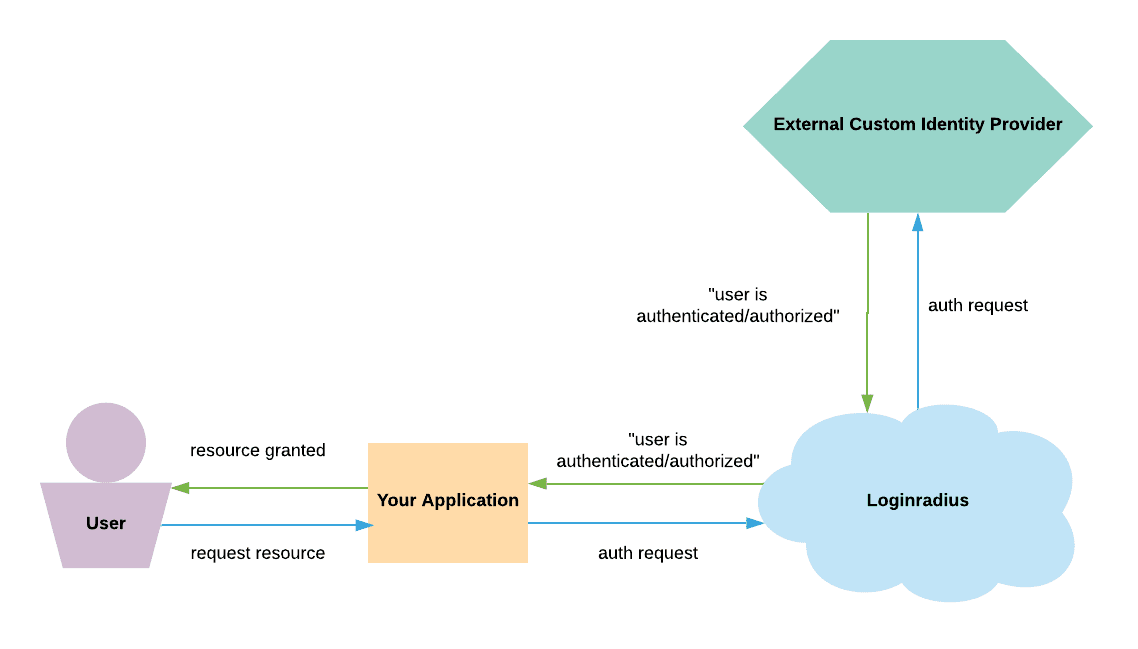
Note: The above representation is a simplified description of the actual communication process between your application, LoginRadius, and identity provider. The actual communication process follows industry standards, and for the same, LoginRadius supports OAuth2 and JWT protocols.
The details of these two protocols are explained in the section below.
Integrations
Our pre-configured templates allow you to manage your Custom Identity Provider integrations easily. LoginRadius enables you to swiftly configure These integrations, allowing users to log in once and seamlessly access multiple applications. Presently, LoginRadius supports the pre-built integration template for the providers mentioned below.
- Salesforce
- Azure AD
- Google Workspace
- PingIdentity
- Okta
You can refer to the Pre-Built Connections document for more details on Integrations.
OAuth2
OAuth2 is an authorization delegation protocol that allows one party to access a customer's resources stored with another party without sharing any credentials.
OAuth2 defines four roles:
- Resource Owner - The customer.
- Client - The entity requesting access to the resource.
- Resource Server - The entity that hosts the resource.
- Authorization Server - The entity that performs the authorization.
When you configure a third party custom identity provider using OAuth2, the configured identity provider effectively becomes the authorization server.
Note: Individual implementations may differ, and the following example serves only as the beginning of a reference point.
For example: If you have configured a third party custom identity provider called OAUTH_CIP; in this case, the four roles of OAuth2 would be as follows:
- Resource Owner - The customer.
- Client - Your front-end application running on the customer's browser.
- Resource server - Your server hosting the page that the customer is requesting access to, for example, account.html.
- Authorization server - OAUTH_CIP
To implement this without LoginRadius would require you to develop your logic and build an OAuth2 client to participate in the authorization process with OAUTH_CIP. LoginRadius simplifies this process for you by becoming a middleware:
- Resource owner - The customer
- Client - LoginRadius
- Resource server - Your server that hosts the page that the customer is requesting access to, for example, account.html.
- Authorization server - OAUTH_CIP
By configuring LoginRadius as the client, you delegate the communications to obtain authorization to LoginRadius. When the response from OAUTH_CIP, the authorization server, is received by LoginRadius, your server can grant the resource account.html to your front-end application running on the customer’s browser.
Note: To set up a Custom OAuth, refer to this document.
Some of the most commonly configured OAuth identity providers include:
JWT
JSON Web Token (JWT) is an open standard that defines a compact and self-sufficient and secure way of transmitting information among parties as a JSON object. The passed information can be verified and trusted since it is digitally signed. JWTs can be signed with the help of a secret or a public/private key pair.
JWT (JSON Web Token) is a popular SSO method, which is widely used by B2C apps, through this system, you can allow your customers to log into an app that supports JWT.
Note: To set up a JWT as a custom identity provider, refer to this document.
SAML
SAML is an XML-based markup language for security assertions. Security assertions are statements used to make access-control decisions. SAML is an open standard for exchanging authentication and authorization data between entities, you can review our SAML overview document for more details.
When you configure a third-party custom identity provider using SAML, the configured identity provider effectively becomes the Identity Provider. Individual implementations may differ, and the following example serves only as of the beginning of a reference point:
For example, you have configured a third party custom identity provider called SAML_CIP; in this case, the 3 roles of SAML would be as follows:
- Principal - the user
- Identity provider - SAML_CIP
- Service provider - your application server
To implement this without LoginRadius would require you to develop your own SAML Service Provider logic in order to participate in the authentication process with OAUTH_CIP. Loginradius simplifies this process for you by becoming a middleman:
- Principal - the user
- Identity provider - SAML_CIP
- Service provider - Loginradius
By configuring Loginradius as a service provider, you have delegated the communications to exchange authentication and authorization data to Loginradius; when the response from SAML_CIP, the identity provider, is received by Loginradius, your server can then begin the process of allowing access control of the principal to the requested resource.
Note: To set up a SAML as a custom identity provider, refer to this document.