Advanced Data-points Requirements and Retrieval
=========
LoginRadius provides a wide range of data-points, but in order to get access to many of these points the Social Provider you are requesting these data points from will have additional requirements that you will need to meet. This document can be used as a quick reference point for why some data may not be being returned in your datasets for the various providers.
Facebook
One of the most common sources of data and also one of the most restrictive Facebook requires that you submit your Facebook app for review in order to get access to some of there data points You can follow the instructions detailed here on submitting your app for review. The following LoginRadius APIs require submitting your app for review:
User Profile API
The user profile has the following data points which require submitting your app for review:
- About - This requires requesting the user_about_me during Facebook app submission.
- Birthdate - This requires requesting the user_birthday during Facebook app submission.
- Books - This requires requesting the user_likes during Facebook app submission.
- City - This requires requesting the user_location during Facebook app submission
- Home Town - This requires requesting the user_hometown during Facebook app submission.
- InterestedIn - This requires requesting the user_relationship_details during Facebook app submission.
- Inspirational People - This requires requesting the user_likes during Facebook app submission.
- Educations - This requires requesting the user_education_history during Facebook app submission.
- Movies - This requires requesting the user_likes during Facebook app submission.
- Television Shows - This requires requesting the user_likes during Facebook app submission.
- Games - This requires requesting the user_likes during Facebook app submission.
- Favorite Things - This requires requesting the user_likes during Facebook app submission.
- Sports - This requires requesting the user_likes during Facebook app submission.
- Positions - This requires requesting the user_work_history during Facebook app submission.
- Political - This requires requesting the user_religion_politics during Facebook app submission.
- Religion - This requires requesting the user_religion_politics during Facebook app submission.
- Website - This requires requesting the user_website during Facebook app submission.
Events API
In order to retrieve the users Events you will need to request the following permissions during Facebook app review: user_events
Groups API
In order to retrieve the users Groups you will need to request the following permissions during Facebook app review: user_groups
Post API(Get)
In order to retrieve the users Posts you will need to request the following permissions during Facebook app review: user_posts
Status API(Get)
In order to retrieve the users Status Updates you will need to request the following permissions during Facebook app review: user_posts, user_status
Likes API
In order to retrieve all of the users Likes you will need to request the following permissions during Facebook app review: user_likes
Albums/Photos API
In order to retrieve all of the users' Albums and Photos, you will need to request the permissions during the Facebook app review: user_photos.
You need to test this permission in your app with any account listed in Roles before you can submit for review so that Facebook can verify this feature has been implemented and tested.
Videos API
In order to retrieve all of the users posted Videos you will need to request the following permissions during Facebook app review: user_videos
Twitter
Twitter has some useful data that can be retrieved for your users and are a lot less restrictive when compared with Facebook. The Following LoginRadius APIs require requesting specific access permissions from Twitter.
Message API(Post)
In order to be able to send direct messages to your Twitter Followers you will need to activate the Access Direct Messages permission on your Twitter app. This can be enabled in the following location:
- Login to your Twitter Dev account at https://dev.twitter.com/
- Click on Manage your Apps.
- Select your App.
- Go to the Permissions Tab.
- Under Access enable "Read, Write and Access direct messages".
Status API(Post)
In order to be able to Tweet to your Twitter feed you will need to activate the Write permission on your Twitter app. This can be enabled in the following location:
- Login to your Twitter Dev account at https://dev.twitter.com/
- Click on Manage your Apps.
- Select your App.
- Go to the Permissions Tab.
- Under Access enable "Read and Write".
Google
Google is one of the most common options for Social Login as it is an extremely popular Email service. The following LoginRadius APIs require specific modifications to your Google App in order to retrieve data:
User Profile API
In order to retrieve data points such as date of birth, city etc other than the basic profile information, you need to enable google+ API under Social API.
- Login to your Google Developers Console.
- Select Your Google App and go to the Admin-console.Select Enable API.
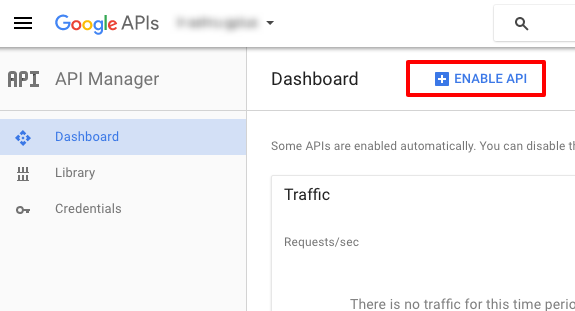
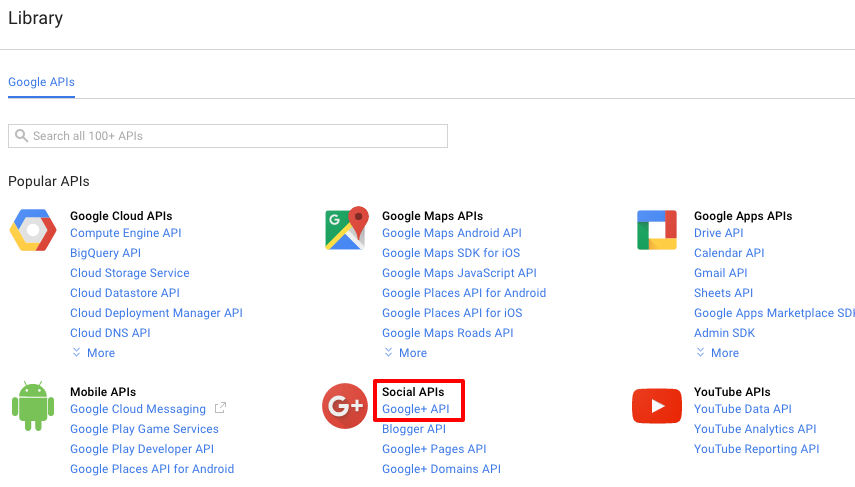
- Select Google+ API under Social API
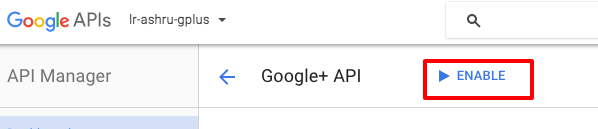
- Select Enable to enable the google+ API
Contacts API
In order to retrieve a list of your Google contacts you will need to activate the Contacts API on your Google App. This can be enabled in the following location:
- Login to your Google Developers Console.
- Select Your Google App.
- Under APIs & Auth Select APIs.
- Search for Contacts and select this.
- Click on Enable to activate this API for your app.
LinkedIn
LinkedIn has recently undergone a revision of their approval process and now require more stringent reviews of some of their access permissions before being able to utilize them in your site. This is a similar process to Facebooks and we have provided an update document in order to submit your LinkedIn App for review with the recent changes here.
User Profile
The following data points included in the LoginRadius User Profile require requesting the r_fullprofile permissions during app creation:
- Birthdate
- Educations
- Phone Numbers
- IM Accounts
- Addresses
- Main Address
- Local City
- Interests
- Associations
- Num. Recommenders
- Honors
- Awards
- Skills
- Current Status
- Certifications
- Courses
- Volunteer
- Recommendations Received
- Languages
- Age
- Patents
- Related Profile Views
- Publications
- Job Bookmarks
- Suggestions
The r_fullprofile can be requested after following the app verification process as follows:
- Navigate to developer.linkedin.com
- Click on "My Apps" in the header.
- Select your App.
- Under Authentication->Default app permissions select the r_fullprofile permission.
Contacts API
In order to retrieve a users contacts list you will need to first request access to this data point for your app by going through the app verification process. You will then be able to set the r_contactinfo permissions as follows:
- Navigate to developer.linkedin.com
- Click on "My Apps" in the header.
- Select your App.
- Under Authentication->Default app permissions select the r_contactinfo permission.
Status API(Post)
In order to post a message to the users wall you will need to request the following default LinkedIn permission during app creation: w_share
This can be set by:
- Navigate to developer.linkedin.com
- Click on "My Apps" in the header.
- Select your App.
- Under Authentication->Default app permissions select the w_share permission.
- Message API(Post)
You can directly send a message to your contacts using our Message API but will first need to apply to the LinkedIn Partnership program to get access to the w_messages permission. Once you have been granted access to this permission you can enable it on your app by following these steps:
- Navigate to developer.linkedin.com
- Click on "My Apps" in the header.
- Select your App.
- Under Authentication->Default app permissions select the w_messages permission.
Yahoo
Yahoo is another common Social Provider and requires some specific settings if you want to guarantee access to specific data points through the LoginRadius APIs. These permissions need to be requested during initial app configuration
Contacts API
In order to access the contacts API you will need to check the contacts box and enable read permissions in the Premium API services section->API Permissions section.
User Profile API
User in Yahoo have the ability to restrict their data to private our allow access by setting to public. If you want to guarantee that you have access to their entire user data set you can request permissions for their private data. During app configuration you will need to check the Profiles(Social Directory) box and enable Read/Write Public and Private permissions in the Premium API services section->API Permissions section. This will allow you to access details marked private as well as their public information.